

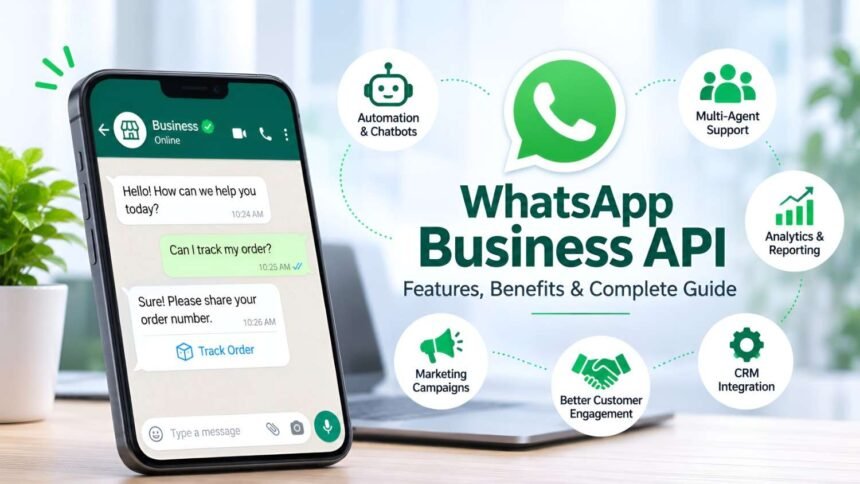
WhatsApp has become one of the most widely used messaging platforms for personal and business communication. As customers increasingly prefer messaging over traditional communication channels, businesses need better ways to connect with their audiences, respond to enquiries, and manage conversations at scale.
This is where the WhatsApp Business API comes in. It helps businesses communicate with customers through automated messages, chatbots, notifications, and personalized marketing campaigns.
Unlike the regular WhatsApp application, the API is designed for medium-sized and large businesses that need advanced communication tools and integration capabilities.
In this guide, we will explore what WhatsApp Business API is, how it works, its key features, benefits, pricing factors, and practical business applications.
What Is WhatsApp Business API?
WhatsApp Business API, also known as the WhatsApp Business Platform, is a business communication solution provided by Meta. It allows companies to integrate WhatsApp messaging into their websites, CRM systems, customer support platforms, and other business applications.
The platform enables businesses to send and receive messages programmatically, automate customer interactions, and manage multiple conversations efficiently.
Unlike the standard WhatsApp Business app, the API does not come with its own standalone messaging interface. Businesses generally access it through a technology provider or their own software integration.
It is particularly useful for businesses that handle a large number of customer enquiries, notifications, and marketing conversations.
How Does WhatsApp Business API Work?
WhatsApp Business API works by connecting a business’s messaging system with the WhatsApp Business Platform.
The general process involves the following steps:
- Business Registration: A business creates or connects its Meta Business Portfolio and completes the required verification.
- WhatsApp Business Account Setup: The business sets up its WhatsApp Business Account and registers a phone number.
- API Integration: The API is connected to a CRM, website, chatbot, or business communication platform.
- Message Configuration: Businesses configure approved message templates for notifications and business-initiated conversations.
- Customer Communication: Customers can message the business, and the company can respond through its connected platform.
Businesses can also use webhooks to receive message updates, delivery reports, and customer interaction events.
Key Features of WhatsApp Business API
WhatsApp Business API offers several features that help businesses improve communication and customer experience.
1. Automated Messaging
Businesses can automate routine communication, including order confirmations, appointment reminders, payment notifications, and customer support responses.
Automation reduces manual work and helps customers receive timely information.
2. WhatsApp Chatbots
Chatbots can handle common customer questions, share product information, collect customer details, and guide users through predefined workflows.
More advanced chatbot integrations can connect with CRM systems and other business applications.
3. Bulk WhatsApp Messaging
Businesses can send approved template messages to multiple customers who have opted in to receive communications.
This is useful for sharing product updates, announcements, promotional offers, and important notifications.
However, businesses must follow WhatsApp’s messaging policies, template requirements, and customer opt-in rules.
4. Interactive Message Templates
WhatsApp supports interactive messaging features such as:
- Quick reply buttons.
- Call-to-action buttons.
- Website links.
- Product and catalog messages.
- List messages.
These features make conversations more convenient and help customers take action directly within WhatsApp.
5. CRM Integration
WhatsApp Business API can integrate with customer relationship management systems to help businesses manage customer information, communication history, leads, and follow-ups.
This allows sales and support teams to work from a centralized system.
6. Multiple Agent Support
Unlike a single-device messaging setup, API-based solutions can support multiple customer service agents through a shared inbox or connected platform.
Teams can manage conversations, assign enquiries, and track customer interactions more efficiently.
7. Analytics and Reporting
Businesses can monitor messaging performance through available analytics and reporting tools.
Depending on the integration, reports may include message delivery, read status, response times, and campaign performance.
Benefits of WhatsApp Business API for Businesses
Adopting WhatsApp Business API can improve several aspects of business communication.
Improved Customer Engagement
WhatsApp allows businesses to communicate through a familiar messaging platform. Customers can ask questions, receive updates, and interact with brands without switching between multiple channels.
Faster Customer Support
Automated replies, chatbots, and shared team inboxes help businesses manage enquiries more efficiently.
Customers can receive quick answers to common questions, while complex enquiries can be transferred to human agents.
Better Lead Generation
Businesses can use WhatsApp links, website integrations, and click-to-WhatsApp advertisements to encourage potential customers to start conversations.
These interactions can help sales teams qualify leads and follow up with interested prospects.
Reduced Manual Work
Automated notifications and predefined workflows reduce repetitive communication tasks. Employees can focus more on complex customer requirements and business operations.
Personalized Communication
Businesses can use relevant customer information to create personalized messages, product recommendations, and follow-up communication, subject to applicable privacy and messaging requirements.
Scalable Business Communication
As a company grows, managing customer conversations manually becomes difficult. API-based messaging provides the infrastructure to handle larger communication volumes through integrated business systems.
Common Use Cases of WhatsApp Business API
WhatsApp Business API can support different industries and business operations.
E-commerce and Retail
- Order confirmations.
- Shipping and delivery updates.
- Abandoned cart reminders.
- Product recommendations.
- Customer feedback collection.
Healthcare
- Appointment confirmations.
- Consultation reminders.
- Healthcare service information.
- Patient support communication.
Businesses must take appropriate precautions when handling sensitive patient information.
Education
- Admission notifications.
- Course information.
- Class reminders.
- Examination updates.
- Student enquiry management.
Banking and Financial Services
- Transaction notifications.
- Payment reminders.
- Authentication messages.
- Account-related updates.
- Customer support assistance.
Travel and Hospitality
- Booking confirmations.
- Reservation updates.
- Check-in reminders.
- Travel notifications.
- Customer assistance.
These use cases demonstrate how WhatsApp can become an important communication channel across different business sectors.
WhatsApp Business API vs WhatsApp Business App
Although both solutions are designed for business communication, they serve different requirements.
| Feature | WhatsApp Business App | WhatsApp Business API |
|---|---|---|
| Target Users | Small businesses | Growing and large businesses |
| Setup | Simple application setup | Platform or API integration |
| Automation | Basic features | Advanced automation |
| Chatbots | Limited native capabilities | Integration-based chatbot support |
| CRM Integration | Limited | Supported through integrations |
| Multiple Agents | Limited linked-device support | Shared inbox solutions |
| Bulk Messaging | Broadcast limitations | Approved template messaging |
| Analytics | Basic | Platform and integration-based reporting |
| Scalability | Suitable for smaller operations | Designed for larger workflows |
Businesses should choose the solution according to their communication requirements, team size, and automation needs.
WhatsApp Business API Pricing: What Should Businesses Know?
WhatsApp Business API pricing depends on the type of messages sent, the destination market, and the applicable Meta pricing structure.
Meta’s current pricing model is primarily based on delivered template messages, with rates varying according to message category and recipient country.
Common message categories include:
- Marketing: Promotional offers, product announcements, and campaigns.
- Utility: Order updates, payment notifications, and other transactional information.
- Authentication: OTPs and account verification messages.
- Service: Customer-initiated support conversations, subject to Meta’s applicable service-window rules.
Businesses may also pay additional charges to their chosen technology provider for platform access, automation, integrations, or support.
Before selecting a provider, businesses should compare pricing transparency, integration capabilities, customer support, and any additional platform fees.
How to Choose the Right WhatsApp Business API Provider
Choosing the right provider is important for building a reliable messaging system.
Consider these factors before making a decision:
- Official Platform Access: Ensure the provider offers access through Meta’s official WhatsApp Business Platform.
- Transparent Pricing: Understand Meta messaging charges and any additional provider fees.
- Automation Features: Look for chatbot builders, automated workflows, and message scheduling.
- CRM Integrations: Check whether the platform supports your existing business tools.
- Team Inbox: Make sure multiple agents can manage customer conversations effectively.
- Analytics: Evaluate reporting features for tracking messaging performance.
- Customer Support: Choose a provider that offers reliable technical assistance.
A suitable provider should support your current requirements while allowing your communication infrastructure to grow.
Best Practices for Using WhatsApp Business API
To achieve better results, businesses should follow WhatsApp’s platform policies and maintain a customer-friendly messaging strategy.
- Obtain customer consent before sending business-initiated messages.
- Use approved templates for messages that require them.
- Avoid sending irrelevant or excessive promotional messages.
- Provide clear options for customers to manage their communication preferences.
- Respond to customer enquiries promptly.
- Protect customer information and follow applicable data protection regulations.
- Monitor messaging quality and campaign performance.
Following these practices helps businesses build trust and maintain a better customer experience.
Conclusion
WhatsApp Business API has become an important communication solution for businesses looking to improve customer engagement, automate conversations, and manage messaging at scale.
From automated notifications and chatbots to CRM integrations and personalized marketing, the platform offers several opportunities to improve business communication.
Whether a company operates in e-commerce, healthcare, education, banking, or another industry, WhatsApp Business API can support more efficient customer interactions.
Choosing the right provider, understanding pricing, and following WhatsApp’s messaging policies are essential steps toward building a successful WhatsApp communication strategy.
As digital communication continues to evolve, businesses that adopt effective messaging solutions can create more convenient and responsive customer experiences.
Frequently Asked Questions (FAQs)
1. What is WhatsApp Business API used for?
WhatsApp Business API is used for business messaging, customer support automation, notifications, marketing campaigns, chatbot integration, and managing customer conversations at scale.
2. Is WhatsApp Business API free?
Access to the platform may involve provider or infrastructure costs. Meta charges for applicable delivered template messages according to its pricing structure. Some providers may offer free plans with limited features.
3. Can small businesses use WhatsApp Business API?
Yes. Small businesses, startups, and growing companies can use WhatsApp Business API to automate communication, manage customer enquiries, and improve their messaging operations.
4. Can WhatsApp Business API send bulk messages?
Yes. Businesses can send template messages to opted-in customers, subject to WhatsApp’s messaging policies, quality requirements, and applicable messaging limits.
5. What is the difference between WhatsApp Business API and WhatsApp Business App?
The WhatsApp Business App is designed for smaller businesses with basic communication needs. WhatsApp Business API is intended for businesses that require advanced automation, integrations, multi-agent support, and scalable messaging.
6. Do I need a WhatsApp Business API provider?
Not necessarily. Eligible businesses can access the Cloud API directly through Meta. However, a technology provider can simplify setup, automation, integrations, and customer support.
WhatsApp Green Tick Application rejected? Follow these top 10 steps