
TechFulgent TechFulgent
Newsletter
  • News
    NewsShow More
    Khau Galli Restaurant
    Khau Galli Restaurant: A Culinary Celebration of Indian Flavors and Bollywood Glamour
    By JITENDRA KUMAR
    Balanced Bites
    Balanced Bites: Launches Customized Meal Plans to Redefine Healthy Living
    By DHIRAJ KUMAR
    Dune Palace Properties
    Dune Palace Properties: Redefining Urban Living with Sustainable Solutions
    By DHIRAJ KUMAR
    Great Relief for Samsung Users!
    Great Relief for Samsung Users! Free Display Replacement Service Available Until December 31
    By DHIRAJ KUMAR
    Virgo HPL World
    Virgo HPL World: Redefining Laminates for Modern Living
    By DHIRAJ KUMAR
  • Android
  • AI Tools
    AI ToolsShow More
    Top 5 AI tools for graphic designers
    Top 5 AI tools for graphic designers
    By DHIRAJ KUMAR
    Top 5 most advanced tools for coding
    By DHIRAJ KUMAR
  • Innovation Startups
    Innovation StartupsShow More
  • Latest Phones
    Latest PhonesShow More
    Price of Redmi A4 5G
    IMC 2024: Price of Redmi A4 5G can be less than Rs 10,000, hints company
    By DHIRAJ KUMAR
    Jio launches two 4G phones
    Jio launches two 4G phones available at just Rs 1099, users calling it Diwali offer
    By DHIRAJ KUMAR
    Realme P1 Speed 5G to launch in India
    Realme P1 Speed 5G to launch in India on October 15, know all about specifications
    By DHIRAJ KUMAR
    Best phones to buy during Amazon
    Best phones to buy during Amazon and Flipkart sale, Infinix GT 20 Pro, OnePlus Nord CE 4 and many more
    By DHIRAJ KUMAR
    Best time to buy foldable smartphones
    Best time to buy foldable smartphones, avail the benefits of Amazon Great Freedom Festival
    By DHIRAJ KUMAR
  • Smart Things
  • Reviews
    ReviewsShow More
    GitHub Review 2024
    GitHub Review 2024: pros, cons, features and everything you need to know
    By DHIRAJ KUMAR
    Dupli Checker Review 2024
    Dupli Checker Review 2024: pros, cons, features, how to use and everything you need to know about
    By DHIRAJ KUMAR
    Wordtune Review 2024
    Wordtune Review 2024: Pros, Cons, Features, How to Use and Everything You Need to Know
    By DHIRAJ KUMAR
    QuillBot Review 2024
    QuillBot Review 2024: Pros, Cons, Features, How to Use, and Everything You Need to Know
    By DHIRAJ KUMAR
    Wondershare Filmora Review 2024
    Wondershare Filmora Review 2024: pros, cons, features, how to use and everything you need to know
    By DHIRAJ KUMAR
Hot News
Khau Galli Restaurant: A Culinary Celebration of Indian Flavors and Bollywood Glamour
Balanced Bites: Launches Customized Meal Plans to Redefine Healthy Living
Dune Palace Properties: Redefining Urban Living with Sustainable Solutions
Great Relief for Samsung Users! Free Display Replacement Service Available Until December 31
Virgo HPL World: Redefining Laminates for Modern Living
TechFulgent > Reviews > Adobe Premiere Pro Review 2024: Pros, Cons, and How to Use
Reviews

Adobe Premiere Pro Review 2024: Pros, Cons, and How to Use

DHIRAJ KUMAR
By DHIRAJ KUMAR
Share
Adobe Premiere Pro Review

Adobe Premiere Pro Review

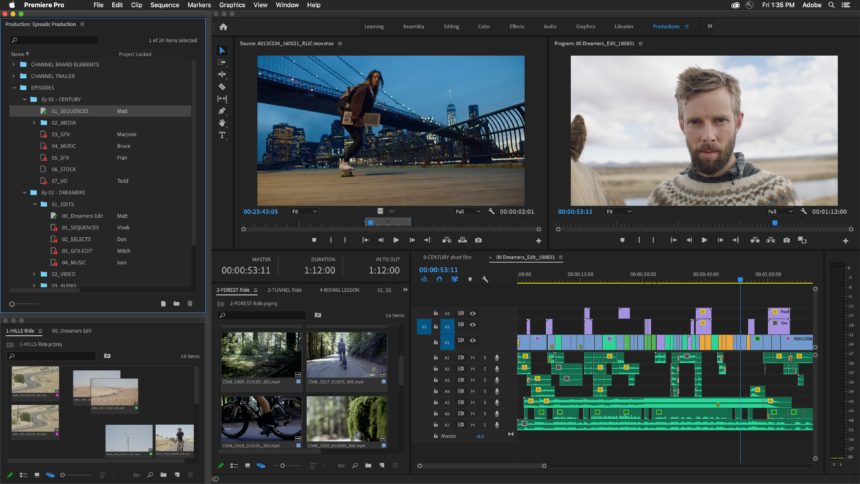
Adobe Premiere Pro is one of the leading video editing software used by professionals and enthusiasts alike. Its powerful features, intuitive interface, and ability to handle high-end video production make it a favorite among filmmakers, YouTubers, and other content creators. Let’s dive into its pros, cons, and how to use it.

Adobe Premiere Pro Review

Pros

Professional-Grade Features: Adobe Premiere Pro offers advanced features like multi-cam editing, dynamic timeline trimming, and seamless integration with Adobe Creative Cloud tools (like Photoshop and After Effects).

Cross-Platform Support: Available on both Windows and Mac, Premiere Pro allows users to switch between systems seamlessly.

Broad Format Support: It supports a wide range of formats, from 8K to VR content, making it versatile for both beginners and professionals.

Customization: Highly customizable workspace and workflow options let users tailor their setup for comfort and efficiency. You can rearrange panels or create shortcuts to suit your editing style.

Integration with Other Adobe Products: Premiere Pro integrates effortlessly with other Adobe apps like After Effects (for advanced visual effects) and Audition (for audio editing), allowing for a more cohesive creative workflow.

Powerful Editing Tools: The software comes with advanced editing tools like color correction (Lumetri Color), sound balancing, and multiple video/audio layer support.

Constant Updates: Adobe regularly updates Premiere Pro with new features, bug fixes, and performance improvements.

Adobe Premiere Pro Review

Cons of Adobe Premiere Pro

Steep Learning Curve: Premiere Pro can be overwhelming for beginners due to its many features. While basic editing is fairly easy, mastering its full capabilities can take time.

Subscription-Based Model: Adobe uses a subscription model (Adobe Creative Cloud), which can be expensive over time, especially for those who don’t use it frequently.

High System Requirements: Premiere Pro can be resource-heavy, requiring a powerful computer to run smoothly, especially when working with high-resolution videos.

Occasional Bugs and Crashes: Users have reported stability issues, particularly during large projects. However, these are generally fixed in subsequent updates.

Complex Interface: While customizable, the interface can feel cluttered at times, especially for new users trying to locate specific tools or functions.

Adobe Premiere Pro Review

How to Use Adobe Premiere Pro

Step 1: Importing Media

After launching Premiere Pro, start by creating a new project.

Import your video, audio, and images by clicking “File” > “Import” or dragging them directly into the media library.

Organize your media into bins (folders) if necessary to keep everything tidy.

Step 2: Creating a Sequence

Drag your video file from the media library into the timeline. Premiere will automatically create a sequence that matches the video format.

Alternatively, you can create a new sequence manually by clicking “File” > “New” > “Sequence,” where you can select your desired settings (resolution, frame rate, etc.).

Step 3: Basic Editing

Cutting: Use the “Razor Tool” (C) to cut clips or drag the edges of clips in the timeline to trim them.

Transitions: Apply transitions between clips by dragging and dropping transitions from the “Effects” panel onto the timeline.

Text and Titles: Use the “Text Tool” to add text or subtitles. You can animate text and customize fonts, colors, and position.

Adobe Premiere Pro Review

Step 4: Audio Editing

Premiere offers tools to balance and enhance audio. You can adjust volume levels by using the audio track mixer or apply effects like equalization and noise reduction.

Add background music or voiceovers by dragging audio files into the timeline.

Step 5: Color Grading

Go to the “Color” workspace or use the “Lumetri Color” panel to adjust color, exposure, and contrast.

You can apply color presets (LUTs) or manually tweak color settings to achieve your desired look.

Step 6: Exporting

Once editing is complete, click “File” > “Export” > “Media.”

Choose the desired export settings (format, resolution, bitrate, etc.). Popular formats include MP4 (for YouTube) or MOV (for high-quality renders).

Click “Export” or send it to Adobe Media Encoder for batch processing.

Adobe Premiere Pro Review

Overall Review

Adobe Premiere Pro is a powerhouse for video editing, catering to everyone from beginner vloggers to professional filmmakers. Its wide range of tools and features make it an industry standard, though it comes with a steep learning curve and a subscription cost. If you need to work on professional projects or want advanced control over your editing, Premiere Pro is hard to beat.

However, for those looking for simpler, less expensive solutions, alternatives like Final Cut Pro (Mac) or DaVinci Resolve might be worth considering.


TAGGED: Adobe Premiere Pro, Adobe Premiere Pro Review, Cons of Adobe Premiere Pro, Pros of Adobe Premiere Pro
Share This Article
Facebook Twitter Whatsapp Whatsapp
By DHIRAJ KUMAR
Dhiraj Kumar is an Indian journalist and passionate social activist from Hilsa, Bihar. As a senior journalist at Foster Times, he is celebrated for his thorough reporting and commitment to social justice. His work informs the public and drives positive change in his community.
Leave a comment

Leave a Reply Cancel reply

Your email address will not be published. Required fields are marked *

TRENDING NOW

Khau Galli Restaurant
News

Khau Galli Restaurant: A Culinary Celebration of Indian Flavors and Bollywood Glamour

Khau Galli Restaurant, founded by Priyanka Agarwal on January 1, 2019, has become a standout name in the United Arab…

By JITENDRA KUMAR November 23, 2024
Balanced Bites
News

Balanced Bites: Launches Customized Meal Plans to Redefine Healthy Living

Balanced Bites, established on July 12, 2023, by Ranzia Rasheed Abdul Jaleel, is revolutionizing healthy eating with its tailor-made meal…

By DHIRAJ KUMAR November 23, 2024
Dune Palace Properties
News

Dune Palace Properties: Redefining Urban Living with Sustainable Solutions

Dune Palace Properties is redefining urban living by introducing sustainable solutions that enhance the quality of life for residents while…

By DHIRAJ KUMAR November 23, 2024
Great Relief for Samsung Users!
News

Great Relief for Samsung Users! Free Display Replacement Service Available Until December 31

Great Relief for Samsung Users Samsung has announced a free display replacement program for certain smartphones to address user complaints.…

By DHIRAJ KUMAR November 22, 2024
Virgo HPL World
News

Virgo HPL World: Redefining Laminates for Modern Living

Virgo HPL World, a global brand under Virgo Pacific Pte Ltd., has redefined laminates to align with the evolving needs…

By DHIRAJ KUMAR November 21, 2024

You Might also Like

GitHub Review 2024
Reviews

GitHub Review 2024: pros, cons, features and everything you need to know

Dupli Checker Review 2024
Reviews

Dupli Checker Review 2024: pros, cons, features, how to use and everything you need to know about

Wordtune Review 2024
Reviews

Wordtune Review 2024: Pros, Cons, Features, How to Use and Everything You Need to Know

QuillBot Review 2024
Reviews

QuillBot Review 2024: Pros, Cons, Features, How to Use, and Everything You Need to Know

TechFulgent TechFulgent
Facebook Twitter Youtube Rss

TechFulgent powered by RAJENDRA HANDLOOMS  is a premier news channel for the latest tech news in India, covering innovations, startups, industry shifts, and tech policy updates with expert analysis and real-time reports.


ADDRESS:- Ground Floor, 15/24, Kamala Nagar, Anantapur, Anantapur, Andhra Pradesh, 515001
GST:- 37AHBPY3115G1ZD

  • Press Center
  • Contact Us
  • Website Map
  • Privacy Policy
  • Terms of Use
  • Your Privacy Rights
  • Cookie Policy
newsletter featurednewsletter featured
Welcome Back!

Sign in to your account

Lost your password?